Print, Reprint or Download Nadakacheri Income, Caste & Residence Certificates
The Nadakacheri portal allows citizens to easily print or reprint certificates online without visiting government offices repeatedly. If you have applied for certificates like caste certificate, income certificate, domicile/residence certificate, rural certificate, or minority certificate, you can download them online once they are approved.
This guide explains everything in detail, who can use this option, what documents or details are required, the difference between print and reprint, complete step-by-step instructions, service fees, common problems, and solutions.
What Are Print and Reprint Options?
- Print Certificate: Used only when you are downloading the certificate for the first time after approval.
- Reprint Certificate: Used when the certificate has already been printed once and you need an additional copy.
Understanding this difference is very important because many users face errors simply by selecting the wrong option.
How to Print Your Nadakacheri Certificate (First Time)
Once your certificate application is approved, the Nadakacheri portal allows you to download the certificate for the first time using the “Print Certificate” option. This option is available only if the certificate has never been printed before.
Step 1: Visit the Official Portal:
- Open the official Nadakacheri website in your browser: https://ajsk.karnataka.gov.in
- Always ensure you are on the official government website to avoid any security issues.
Step 2: Login Using Mobile Number and OTP:
- On the homepage: Click on Apply Online
- Enter the mobile number used during application
- Click Get OTP
- Enter the OTP received on your phone and log in
No username or password is required. The portal works entirely through OTP-based authentication. If you haven’t applied for your certificate yet, check out our easy step-by-step guide on how to apply for Nadakacheri certificates.
Step 3: Select the “Print Certificate” OptionL
- Go to the Print menu on the dashboard
- Click on Print Certificate
This option will appear only if your certificate has never been printed before.
Step 4: Enter RD Number:
- Enter your RD Number correctly
- Click on Search
The system will retrieve your certificate details automatically.
Step 5: Verify Certificate Details:
Once the certificate details appear:
- Carefully check your name, address, certificate type, and other personal details
- Make sure there are no spelling errors or incorrect information
If you find any mistakes, do not print the certificate immediately. Contact your Taluk office or Nadakacheri center for correction.
Step 6: Download and Print the Certificate:
After verification:
- Click on Print
- The certificate will be downloaded as a PDF file
- Save it securely on your device
This certificate is digitally signed and is valid for official purposes such as education, employment, and government schemes.
How to Reprint Nadakacheri Certificate (Duplicate Copy)
If your certificate was already printed earlier and you need another copy, you must use the Reprint Certificate option.
Step 1: Login to the Nadakacheri Portal
Visit the official website and log in again using:
- Registered mobile number
- OTP received on your phone
Step 2: Choose “Reprint Certificate”
From the dashboard:
- Open the Print menu
- Click on Reprint Certificate
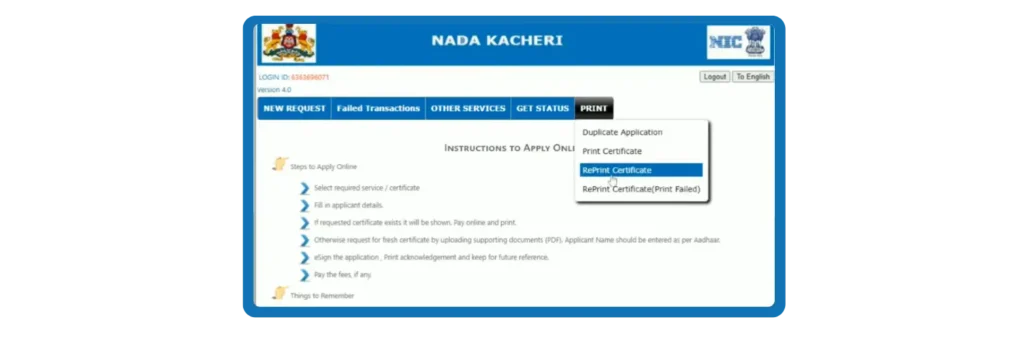
This option is only for certificates that were previously printed.
Step 3: Enter Application Reference Number
- Enter your RD Number
- Click on Search
Step 4: Preview Certificate Before Payment
After details appear:
- Review all certificate information carefully
- Tick the confirmation checkbox
- Click on Draft View / Preview
This step ensures that you are paying the fee for the correct certificate.
Step 5: Pay the Reprint Service Fee
To proceed, you must pay the service fee (₹40).
- Click Pay Service Fee
- You will be redirected to SBI e-Pay
- Pay using:
- UPI (PhonePe, Google Pay, Paytm)
- Debit card / Credit card
- Net banking
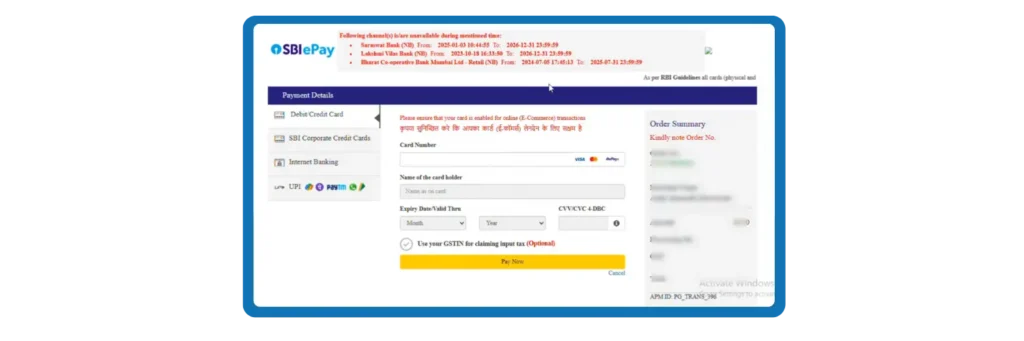
Do not refresh or close the page during payment.
Step 6: Download and Print the Certificate
After successful payment:
- The Print button will become active
- Download the certificate PDF
- Print it if required
The reprinted certificate is also digitally signed and fully valid.
Certificates You Can Print or Reprint on Nadakacheri
Using the Nadakacheri portal, you can print or reprint multiple Karnataka government certificates, including:
All these certificates are issued under Atalji Janasnehi Kendra (AJSK) and are digitally signed and legally valid.
Who Is Eligible to Print or Reprint Nadakacheri Certificates?
You can use the this facility only if all the following conditions are met:
- Your certificate application status is Approved
- You have the Application Acknowledgement Number (ACK) or RD Number
- You are logging in with the same mobile number used during application
- For reprint, you are ready to pay the service fee
If your application is still under process, rejected, or pending for verification, the print option will not be available. To check the status of your application, read our detailed guide on how to check Nadakacheri Application Status.
Difference Between Print and Reprint
- Print: Only for first-time printing once the certificate is approved.
- Reprint: For additional copies at a small fee.
| Feature | Reprint | |
|---|---|---|
| First copy after approval | ✔ Yes | ❌ No |
| Additional copies | ❌ No | ✔ Yes |
| Fee | ❌ Usually free | ✔ Fee applicable (₹40) |
| Option availability | After approval | After first print |
Important Tips for Smooth Printing
Common Issues and How to Fix Them
- Application is not in Print Stage:
- Your certificate is not yet approved
- The certificate was printed earlier→ Use Reprint Certificate instead.
- Print button doesn’t show after payment
- Enter your RD number again
- Make sure browser pop-ups are allowed
- Wrong mobile number on portal
- OTP is sent only to your Aadhaar-linked mobile number
- Update your mobile number in Aadhaar first
- Payment failed or timeout
- Use stable internet connection
- Enter exact amount requested by the payment gateway
- Try SBI e-Pay for easier processing
- Printer not responding
- Save the certificate PDF → print from PDF reader
- Make sure your printer is connected and working
Service Fee Details
- Printing (first time): Usually free (depends on certificate type)
- Reprint (duplicate copy):₹40 (standard fee)
- Paid through SBI e-Pay
- Can use UPI, debit/credit card, net banking
Prupose of Print & Reprint options
Earlier, people had to visit the Taluk office or Nadakacheri centers just to collect or reprint certificates — this caused long waits and travel. Now, with online printing, you can:
- Access your certificate from anywhere
- Print multiple times
- Save time and money
- Avoid office visits
This is especially helpful for people in rural areas or those with limited mobility.
Safety & Security Tips
- Keep your RD number private — sharing it may allow others to access your certificate.
- Always use the official portal (nadakacheri.karnataka.gov.in).
- Beware of fake third-party websites claiming to provide certificates.
- If you notice wrong details on a printed certificate, contact your nearest Taluk office immediately to correct it.
Helpline & Support
If you face any issue while printing or reprinting:
Conclusion
The Nadakacheri portal makes it easy to print, reprint, or download income, caste, and residence certificates online using your RD number. The process is fully digital, saving time and avoiding repeated visits to government offices. All certificates downloaded from the portal are digitally signed and officially valid across Karnataka.
By following the correct steps and checking details carefully, you can get your certificate without issues. Always keep your application number and downloaded PDF safe for future use. If you face any problems, help is available through the Nadakacheri portal or nearby Janasnehi Kendra offices.