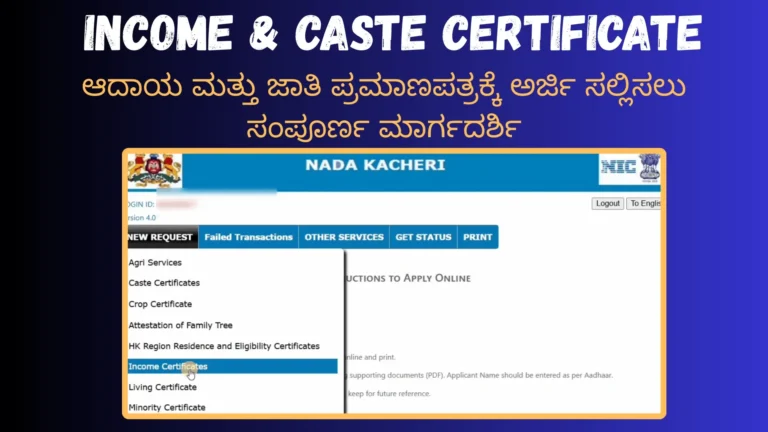
How To Check Nadakacheri Status Online?
If you’ve applied for any certificate through the Nadakacheri 5.0 portal in Karnataka, checking your Nadakacheri Status online is the easiest way to know your application progress. It helps you track whether your request for caste, income, or residence certificate is under review, approved, or rejected. This article will guide you step-by-step on how to check your application status quickly and correctly.
What is “Nadakacheri Status”?
When you apply for a certificate (like caste, income, domicile, residence or family tree) through the Nadakacheri service in Karnataka, you receive a tracking Number (also called an RD number). Using this number, you can check your application status online. The status shows the progress of your application, such as received, under review, approved, or rejected.
This service is available on official Nadakacheri new version 5.0 portal, so you don’t need to visit the office again and again. Citizens can check their application status anytime using their phone or computer.
How to Check Nadakacheri 5.0 application Status Online?
There are two main methods for Nadakacheri 5.0 status check:
A) By Using Acknowledgment (RD) Number
- Visit the official page at: https://nadakacheri.karnataka.gov.in/
- Choose your preferred language (English or Kannada).
- Select the option “Acknowledgment Number” (or similar).
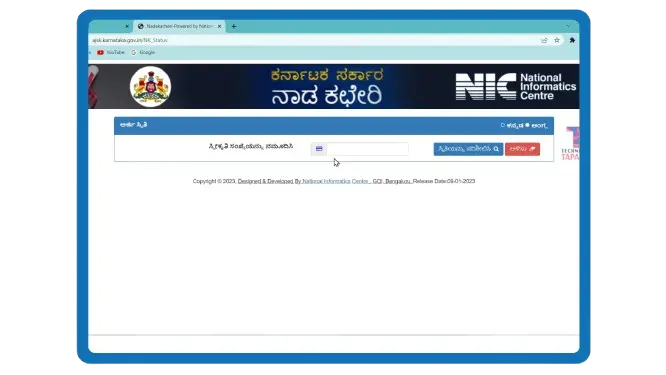
- Visit the official page at: https://nadakacheri.karnataka.gov.in/ or you can also check Nadakacheri status at http://ajsk.karnataka.gov.in/NK_Status
- Choose your preferred language (English or Kannada).
- Select the option “Acknowledgment Number” (or similar).
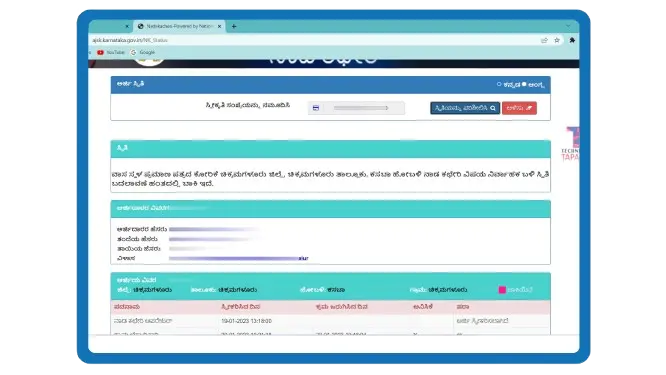
- You’ll see a screen showing:
- Application number / RD number
- Service applied for
- Status of each processing stage
- Remarks if any
B) By Using Mobile Number
If you do not remember your RD number, you can also use your mobile number (the one you used when you applied) for AJSK status check online.
- Go to the same status page.
- Select the “Mobile Number” option.
- Enter your mobile number (ensure it’s the same one used during application).
- Click “Send OTP” and then enter the OTP you received.
Warnings: Never share OTP or personal details with unofficial callers claiming to be from Nadakacheri.
- From the dropdown, choose the service you applied for (caste certificate, income certificate, family tree certificate etc.).
- Enter CAPTCHA and click “Check Status”.
- Your application will appear on the screen. Click on the RD number to see detailed status online.
Additional Tip: If you applied offline at a Nadakacheri center, you can still use both methods to track your application.
Understand NK5 Status Columns
Here are some words you may notice on the screen and their meanings when you perform NK5 status check:
Once all offices finish checking your application and mark it as Approved, it goes for final signing. After that, your certificate will be ready to download.
Term | NK5 Status Meaning |
|---|---|
Designation | The official who is checking your application (for example: VAO, Revenue Inspector, Tahsildar, Case Worker, Deputy Tahsildar) |
Received On | Date and time when your application reached that office |
Action Taken On | Date when the officer acted (approved/rejected/forwarded) on your file |
Status | Shows if your application is Pending, Forwarded, Approved or Rejected |
Remarks | Explanation of what was done or why something is delayed/rejected. Always read this carefully. |
Once all offices finish checking your application and mark it as Approved, it goes for final signing and e-Kshana processing. After that, your certificate will be ready to download from the portal.
Extra Information: The portal also shows the complete workflow trail, helping you understand exactly where your file is stuck (e.g., with Revenue Inspector or Tahsildar level).
Why Checking Nadakacheri application Status is Important?
Why Nadakacheri AJSK Applications Get Rejected?
Sometimes the certificate request may get rejected. Here are some common reasons:
What Steps to Take After NK5 Application Rejection?
How To Fix Pending or Rejected NK5 Application Status?
If your application rejected then you can us ethe following methods which I use commonly recommended others when they contacted me for help and they worked every time :
New Practical Tip: Take screenshots of the status page for your records, especially if there are important remarks.
Nadakacheri (AJSK) Certificate Approval Time
The time depends on Nadakacheri services you have applied for (caste, income, residence) and the quality of documents. Generally processing takes 7 to 21 days, sometimes up to 45 days if verification is complex or during peak seasons (admission time).
If the delay is longer than usual, you can contact the district office or your nearby Nadakacheri center and tell them your application number.
You can also check the Disposal Index Report on the portal for average processing times in your district.
How to Check Nadakacheri Status Easily
To check your Nadakacheri 5.0 certificate status easily follow the given steps:
Helpline
If you face any issues while checking your application status, reach out to your district Nadakacheri center:
- Helpline: 080-22214588
- Email: [email protected]
- Timings: Monday–Saturday, 10 AM to 5 PM
Conclusion
If you’ve applied for a certificate through Nadakacheri 5.0, you don’t have to wait wondering about the progress. Use either your RD number or your mobile number online to check exactly where your application stands.
If everything is okay, you’ll soon see “Approved” and you’ll be able to download and print your certificate. If not, the “Remarks” will help you to fix the problem. Always keep your acknowledgment number safe and use the official portal links only. Regular status checking makes the entire process smoother and stress-free.