Nadakacheri Certificate Verification (CV) – Verify Online in Karnataka
Many people in Karnataka need to verify certificates such as income, caste, or residence for jobs, education, or government schemes. However, visiting offices for verification often takes time and causes unnecessary delays.
To make this process easier, the Government of Karnataka introduced the Nadakacheri 5.0 Certificate Verification (CV) system. It is a digital service that allows people to verify their official certificates online in a quick and transparent way. Citizens can download their certificates anytime through the Nadakacheri portal using their mobile phone or computer with an internet connection.
What is Nadakacheri Certificate verification (CV)?
Nadakacheri CV (Certificate Verification) is an online facility provided under the Atalji Janasnehi Kendra (AJSK) project of the Karnataka Government.
Through this digital system, citizens, government departments, and institutions can verify the authenticity of certificates issued from Nadakacheri. The system uses a unique RD Number (Revenue Department Number) or Acknowledgment Number printed on every certificate.
When a user enters this number on the verification portal, the system instantly displays whether the document is genuine, expired, or invalid, ensuring a transparent and secure process.
How to Verify Nadakacheri Certificate (Step-by-Step Guide)
Verifying a Nadakacheri 5.0 certificate online is simple and only takes a few seconds. Follow these steps carefully:
Step 1: Visit the Official Portal
- Go to the official website: https://nadakacheri.karnataka.gov.in.
- On the homepage, navigate to the “Certificate Verification” section.
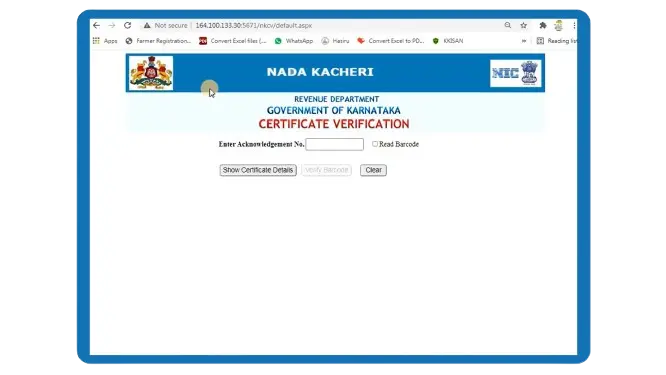
Step 2: Enter RD or Acknowledgment Number
- Locate your RD Number (found on the top of your issued certificate).
- Enter this number into the provided input box on the page.
Step 3: Fill the Security Captcha
- Type the exact captcha or verification code shown on the screen to proceed.
Step 4: Click “Show Certificate Details”
- Once you click, the system will fetch the certificate details from the Nadakacheri database.
Step 5: View Verification Result
If the certificate is valid, you’ll see:
- Applicant’s name
- Type of certificate (e.g., Income / Caste / Domicile)
- Date of issue
- Verification ID / RD number
- Status (Valid / Invalid)
- Expiry Date
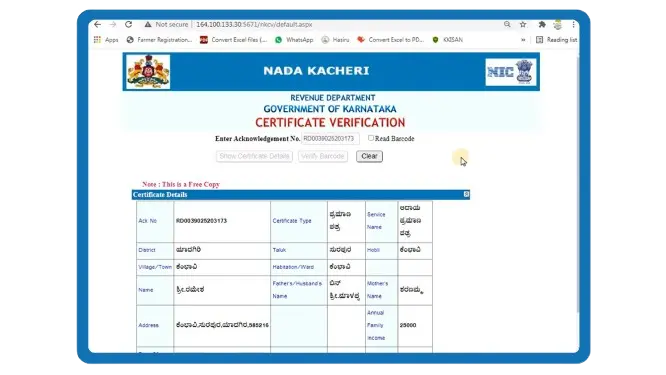
If the certificate is expired or invalid, a message such as “Certificate Expired / Not Found” will appear.
Purpose and Benefits of Nadakacheri Certificate Verification
The main goal of the Nadakacheri CV service is to prevent fake certificate use and to make verification easier for both applicants and authorities.
Earlier, people had to visit local offices to confirm whether a certificate was valid. Now, verification is possible 24/7 through the official portal. Here are the key benefits of Nadakacheri CV:
Certificates You Can Verify on Nadakacheri CV Portal
Through the Nadakacheri CV portal, users can verify several key certificates issued by the Karnataka Revenue Department, such as:
These certificates can be checked online to confirm their authenticity and validity.
Different Login Access for Citizens and Officials
The Nadakacheri CV Login page is designed for both citizens and authorized officials.
Citizen Login
For public users, the login allows:
- Tracking the status of applications
- Verifying certificates
- Accessing the certificate verification dashboard
Official Login
Authorized officers of the Revenue Department and Atalji Janasnehi Kendras can log in using their credentials to:
- Validate applications
- Manage CV records
- Update certificate verification data
To access the login portal, go to:
https://nadakacheri.karnataka.gov.in/ajsk
Tracking Application Status
You can easily check the status of your Nadakacheri certificate application online:
- Visit https://nadakacheri.karnataka.gov.in
- Open the “Application Status” section
- Enter your Acknowledgment / RD Number and click “Get Status”
This lets you instantly know whether your certificate is approved, pending, or rejected, without visiting any office.
Download Your Certificate
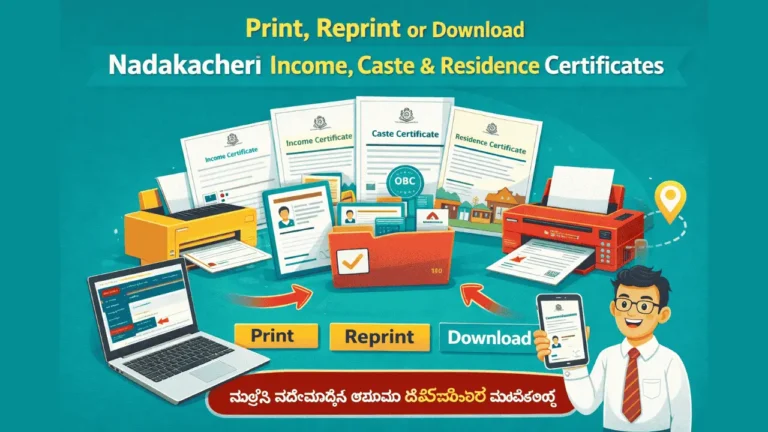
Once your application is approved, you can easily download your Nadakacheri certificate in PDF format through the official portal. This document can be used for educational, employment, banking, or other government purposes.
Once your application is approved, you can easily download your Nadakacheri certificate in PDF format through the official portal. This document can be used for educational, employment, banking, or other government purposes. You can also read our detailed guide on how to print Nadakacheri Certificates.
Nadakacheri CV Renewal: Extending Certificate Validity
Some certificates issued through Nadakacheri such as income or caste certificates are valid only for a specific period. When the validity expires, users may need to renew them to continue using them for official purposes. The renewal process can be completed easily through the Nadakacheri portal by logging in and reapplying for the same certificate type.
Users of the Nadakacheri CV Portal
The Nadakacheri Certificate Verification (CV) portal can be used by different groups across Karnataka, such as:
- Citizens: To verify their own certificates online.
- Employers and Institutions: To check the authenticity of documents submitted by applicants.
- Government Departments: To confirm certificate validity before approving benefits or schemes.
- Revenue Officers / AJSK Staff: To manage and validate verification requests.
Common Issues and Solutions During Verification
While verifying certificates on the Nadakacheri CV portal, users may face a few common issues. Here’s how to fix them quickly:
Most of these issues are temporary and can be resolved easily by verifying the information provided or retrying after a short time. Alternatively, visit your nearest Nadakacheri center or taluk office for in-person assistance.
Helpline and Support
If you face technical difficulties while verifying certificates or checking CV status, you can contact:
- Nadakacheri Helpline: 080-22214588
- Email: [email protected]
- Timings: Monday – Saturday, 10 AM to 5 PM
Conclusion
The Nadakacheri Certificate Verification (CV) portal has made it very easy for Karnataka residents to verify official documents instantly. By entering just a simple RD number, anyone can confirm the authenticity, validity, and status of certificates issued by Nadakacheri.
With the launch of CV Nadakacheri 5.0, the process has become even faster, more secure, and user-friendly. Whether you’re a citizen verifying your own document or an institution checking authenticity, Nadakacheri CV ensures trust, transparency, and accessibility in every verification.